Android app to create and organize messaging stickers
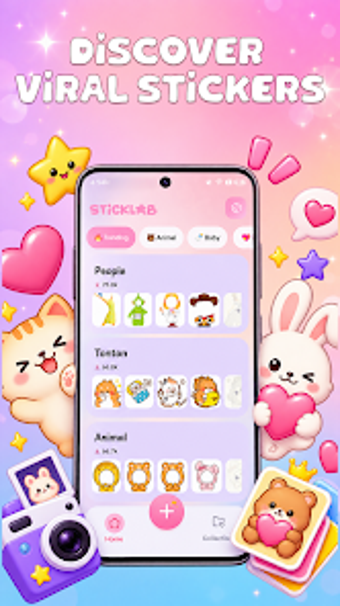
StickLab: Making sticker, from Taptura Studio, is an Android personalization studio that helps users create and manage custom stickers for messaging and social posts. The app converts gallery images into sticker-ready assets and offers an integrated library plus in-app editors for text and drawing. Aimed at social media enthusiasts and frequent messengers, it focuses on quick sticker production and ongoing content updates for regular conversation use.
What StickLab brings to chat and social workflows
StickLab converts photos into ready-to-send stickers through a Photo Import flow, then stores creations inside user-defined sticker packs for direct reuse in messaging. The app also houses a large catalog of premade designs that receives weekly updates, so users can pick trending or aesthetic packs without sourcing external files. These elements keep sticker assets available inside the app rather than scattered across the device.
How much control users get over final sticker design
The app provides layered editing tools that let creators refine typography, artwork, and finishes. The advanced text editor supports curved text placement and shadow outlines while a manual brush enables hand-drawn additions. Customization also covers color adjustments and effect overlays for library items. Key tools include:
- Multiple font choices plus curved text and shadow effects
- Manual brush for sketches and accents
- Color and effect overlays applied to existing stickers
How approachable it is for casual creators on Android
Installation targets modern Android phones and the Photo Import workflow lets users select images from the gallery and let the app handle isolation automatically. Built-in pack management provides naming, grouping, and onboard organization to reduce file juggling between apps. Users report appreciation for the cutout quality and the steady library updates, which make producing and refreshing sticker collections practical for casual creators and social users.
Final assessment and recommended user
StickLab is a practical option for social and messaging users who want to create personalized sticker packs on mobile; it balances quick creation with enough depth for deliberate design. Users should expect a modest learning curve to master the more advanced controls. It fits creators who share stickers frequently across messaging threads and need a single app to assemble and manage recurring sticker collections.